

Have you ever seen bold, italic, or fancy font styles on Facebook and wondered, “How did they do that?” In the age of burgeoning social media, writing with beautiful text styles not only helps your posts stand out but also expresses your unique personality and style. From using bold, italics, and strikethroughs, to changing to artistic fonts, all of it can be done easily with just a few simple steps. This article will guide you on how to write with beautiful fonts styles on Facebook and Websites in 2025, along with online font generation tools that will make your statuses, comments, blog posts, or website content more captivating and professional.
Benefits & Introduction to Writing with Beautiful Fonts Styles
Writing with beautiful text styles on Facebook or your website isn’t just about “dressing up” your post—it is also an effective communication strategy that helps your content stand out among thousands of other statuses or blog posts. Here are the main benefits that beautiful text styles bring:
- Increases Reader Attraction When you use bold or italic text correctly, the post becomes easier to read, emphasizes important content, and keeps readers engaged longer. Especially on Facebook—where users scroll very quickly—a noticeable line of text can make them pause to read more carefully.
- Expresses Unique Style & Personality Changing the font style to something wavy, artistic, or retro helps express your unique personality and style. Such statuses are often shared and commented on more by others.
- Enhances Personal Brand & Content Value On a website or blog, presenting text beautifully makes the content look more professional and trustworthy. This is extremely important in SEO and user experience—because an easy-to-read, eye-catching article helps viewers stay longer.
- Easy to Use Nowadays, you don’t need to install complex software. With just a free online font generator or a direct text-changing tool, you can create dozens of different text styles—from simple to artistic—in just a few seconds.
How to Write with Beautiful Fonts Styles on Facebook (2025)
Facebook is where users express their personality and share emotions every day. Among the thousands of posts that appear on the newsfeed, using beautiful text styles—bold, italic, strikethrough, or artistic fonts—helps you create emphasis and attract viewers more effectively. Below is a detailed guide on the easiest way to write with beautiful text styles on Facebook in 2025.
Writing Beautiful Text Styles Using the YayText Tool
YayText.com is the most popular tool to help you create special text styles on Facebook. This site supports many different formats, such as:
- Bold – to highlight important content.
- Italic – to express emotion or provide subtle emphasis.
- Strikethrough – used when wanting to edit or express a humorous idea.
How to do it:
- Access YayText.com.
- Type the text you want to change the style of.
- Select the desired format (Bold, Italic, Strikethrough, etc.).
- Copy the result and paste it into your Facebook status, comment, or bio.
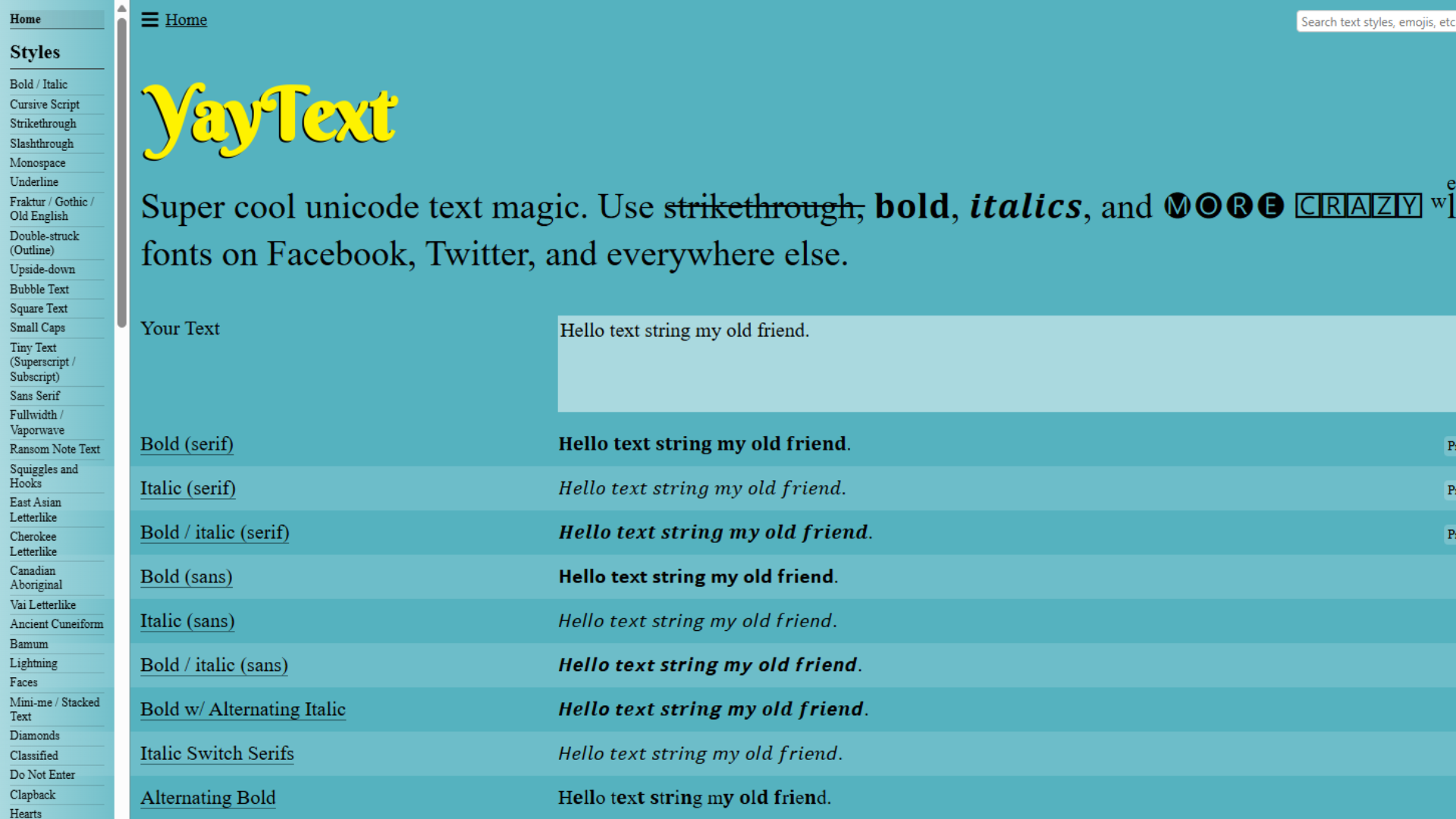
The advantage of YayText is that it requires no installation, is easy to use, and displays well on most devices. You can also combine multiple formats within the same post.
Changing to Artistic Fonts (Fancy Font)
Besides the basic styles, you can use artistic fonts to make your posts even more impressive.
How to do it:
- Access LingoJam.com or CoolSymbol.com.
- Enter the content you want to transform.
- Select the suitable font style and copy it to paste onto Facebook.
These tools offer hundreds of creative fonts, allowing you to customize your post’s style as you wish—from simple and elegant to unique and personal.
Tips for Effective Use of Beautiful Text Styles on Facebook
- You should only use 1–2 text styles in the same post to ensure readability.
- Artistic fonts are suitable for titles, while the main body content should be kept simple.
- Combine emojis to increase expressiveness.
- Check the display again, as some fonts may appear differently between mobile devices and computers.
How to Write with Beautiful Fonts Styles on Websites (HTML, WordPress, Blogspot…)
Presenting text beautifully on a website not only makes the article more lively but also enhances the reading experience, keeping viewers engaged longer. Below is a detailed guide on how you can customize the text on your website—from basic to advanced, applicable to all platforms like HTML, WordPress, or Blogspot.
Writing Beautiful Text Styles Using HTML Tags
If you are managing your website manually or have the authority to edit HTML code, you can use built-in text formatting tags to highlight content.
Some commonly used basic tags:
<b>or<strong>– Bold text<i>or<em>– Italic text<u>– <u>Underline</u><s>or<del>– <s>Strikethrough text</s>
Example:
<p>
 This is <b>bold text</b>,
 <i>italic text</i>, and
 <s>strikethrough text</s>.
</p>
These tags are supported on most browsers and Content Management Systems (CMS), allowing for quick formatting without the need for plugins.
Using the WordPress Editor
If you use WordPress, writing beautiful text styles is even simpler:
- In the Gutenberg or Classic Editor, you can bold, italicize, strikethrough, and change text color directly within the toolbar.
- To create more artistic text, you can install supporting plugins such as:
- TinyMCE Advanced (WP Edit) – expands text formatting capabilities.
- Custom Fonts or Google Fonts Typography – adds many exclusive font options.
- Elementor or Divi Builder – allows flexible font style customization using drag-and-drop actions.
Writing Beautiful Fonts Styles on Blogspot
For Blogspot users, you can write beautiful text styles in two ways:
- Using the Visual Editor (which has buttons for B, I, U, colors, etc.).
- Switching to HTML mode and adding formatting tags like
<b>,<i>, or<u>.
If you want to use unique or artistic fonts, you can add a small CSS snippet to the “Theme → Edit HTML” section:
.custom-font {
 font-family: 'Pacifico', cursive;
 font-size: 20px;
 color: #2c3e50;
}
Then, in your post, you just need to call that class:
<p class="custom-font">
 Hello, this is beautiful text style!
</p>
Tips for Creating Eye-Catching Text Styles
- Choose a font that matches the theme (e.g., artistic fonts for a personal blog, simple fonts for a news website).
- Use a slightly contrasting text color against the background for better readability.
- Combine bold + italic text for emphasis without cluttering the view.
- Limit the use of too many styles within the same paragraph.
FAQ – Frequently Asked Questions About Writing Beautiful Text Fonts
Is writing stylized text on Facebook a violation of policy?
No. These text styles are simply special Unicode characters which are completely valid and do not violate the policy of Facebook or any other platform.
Why can’t some people see the text style I wrote?
The cause is usually that the device or browser is outdated and does not fully support the necessary Unicode characters. In this case, others may only see square boxes or question marks instead of the stylized text.
Can I write stylized text directly in Facebook comments?
Yes. You just need to copy the converted text from YayText or LingoJam, and then paste it directly into the comment box or Messenger chat.
Is there a difference when using Android versus iPhone?
Not much. Both operating systems support Unicode, so the stylized text displays similarly. However, some special characters may look slightly different depending on the default font used.
Can beautiful text styles be used on a website or blog?
Absolutely. You can directly insert the stylized text into titles, descriptions, or blog posts. However, you should avoid overusing them to maintain professionalism and optimize SEO.
Conclusion & Final Advice
Writing beautiful text styles on Facebook and websites not only helps you express your personality but also creates outstanding emphasis for your posts, captions, or article titles. Whether it’s bold, italic, strikethrough, or stylized fonts, all can be done easily in just a few seconds using online tools like YayText or LingoJam.
However, you should use them sparingly and reasonably, avoiding the overuse of different text styles that can clutter the view or reduce professionalism. Remember, beautiful text is merely a tool to help convey a message more creatively; it does not replace the quality of the content.
If you want to stay updated on more Facebook tricks, content writing tips, and useful tool guides, don’t forget to visit Softbuzz.net regularly—the place that compiles quality articles to help you master social media and technology more easily every day.