
Are you looking for the latest dlc boot 2019 Google Drive tool! Want to learn how to download DLC Boot 2019! Just starting to use dlc boot 2019. All will be shared by Softbuzz in the article below.
DLC BOOT 2019, 2020
DLC Boot is considered one of the essential tools for IT professionals or computer repair centers. It is one of the most professional and best ways to create usb boot currently. Having this dlc usb boot creator toolkit will help you resolve common computer errors and issues. DLC boot is indispensable for performing ghost win operations. If you don’t know how to ghost win 7 using usb boot, you can refer to more at: How to ghost win 7 by usb DLC Boot 2019 is the latest DLC boot set launched on April 11, 2019, at DLCboot.com. The tool to create usb boot dlc was created by Mr. Trần Duy Linh and is an extremely versatile boot tool, crucial for rescuing computers when encountering problems.
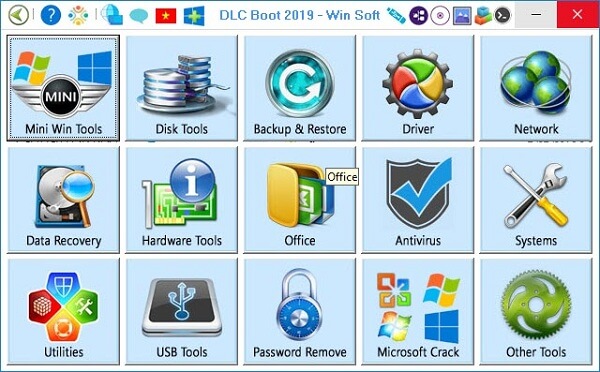
With dlc boot software, you can create rescue USBs that work with both UEFI and legacy standards, formatted as FAT32, support Mini Win 10, combine partition management without data loss, driver update tools, and more. Regarding Softbuzz, DLC Boot is highly rated for its quality as a boot USB, simple to use, and is a very useful system software that everyone should own.
Tools in DLC Boot 2020
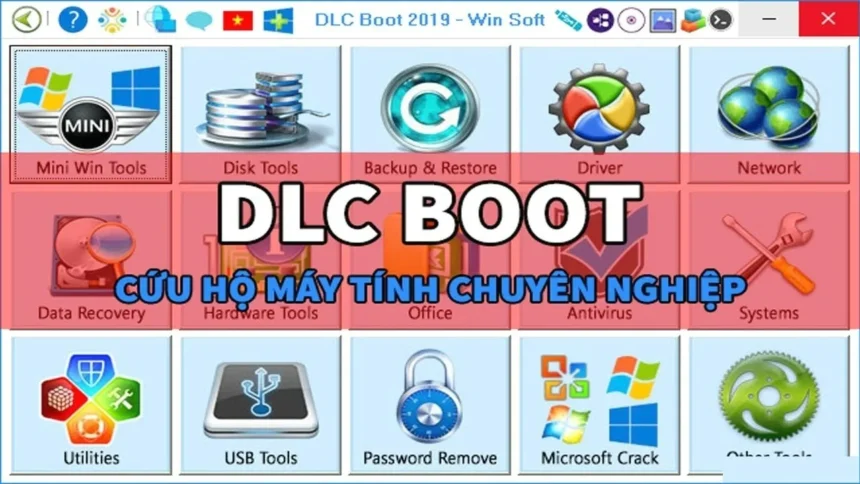
DLCboot 2020 is a customized version of Hirenboot, integrated with many tools suitable for inspecting, troubleshooting, and repairing technical issues of computers and laptops. The tools included in DLC boot 2020 are similar to those of other DLC boot versions.
- Disktools/Partition tools: Hard drive partitioning tools.
- Backup/RestoreTool: Backup, recovery, ghosting tools.
- Driver: Driver management tools.
- Recovery/Data Recovery: Data recovery tools for accidental deletion/formatting.
- Hardware Tools: Hardware information checking tools.
- Office: Office application tools.
- Antivirus: Antivirus software.
- System: System software.
- Ultilities: Extension utilities.
- USB tools: USB-related tools.
- Password: Password crack or removal software.
- Microsoft: Windows activation tools.
- Other tools: Additional tools.
What’s new in DLC Boot 2020
- Integrated Mini Windows 10 32Bit & 64Bit by anhdv, tested by DLC (Editing, Music Play, Movie Viewing, USB 3.0, USB 3G, UEFI), built in a working environment similar to Mini Windows XP in Hiren’s BootCD.
- Added Mini Windows XP from Hiren’s BootCD 15.2, with improvements and optimization.
- New external DOS tools added.
Other DLC boot sets
Besides the latest DLC boot 2020, older versions are also useful boot USB sets that should not be missed by those who love fixing and troubleshooting computers.
- DLC Boot 2019
- DLC Boot 2018 (no DLC Boot 2018 set, so cannot download DLC Boot 2018)
- DLC boot 2017 v3.4.
- DLC boot 2016.
- DLC boot 2015.
- DLC boot 2013.
You might be interested in:
- Ghost Win 10 64bit
- Ghost Win 7 64bit image
Download other DLC Boot versions
- Download DLC Boot 2013 Google Drive | Fshare
- Download DLC Boot 2015 Fshare
- Download DLC Boot 2016 Fshare
- Download DLC Boot 2017 Google Drive
How to create a Boot usb with DLC Boot
Note before creating a multi-purpose boot usb
To ensure that creating a Windows 10 rescue usb with dlc doesn’t have errors afterward, you should:
- Disable or turn off antivirus software (if any).
- Disable Windows Defender on Windows 10.
- Turn off Windows Firewall.
- Prepare a usb drive over 4GB.
- Prepare the dlc boot set you want.
How to make a usb boot with dlc boot 2019
To create the DLC 2019 Usb Boot, do as follows: Step 1: Download dlc boot 2019 latest full version. Step 2: Extract the file “DLC.Boot.2019.V3.6” using the latest winrar. (You can easily get the latest winrar on softbuzz). Then run the file DLC Boot.exe as Admin. Step 3: Choose the icon Create USB, HDD Box Boot.
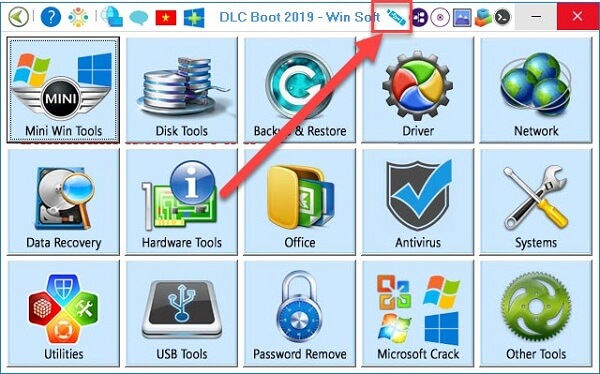
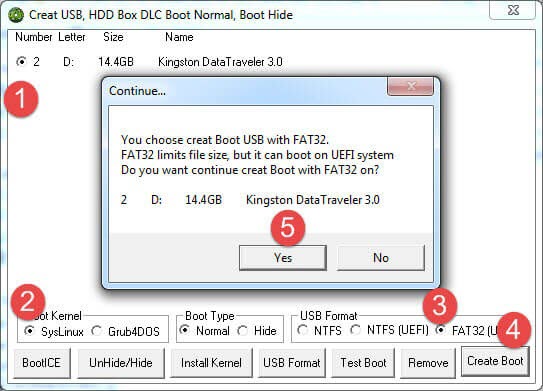
Step 4: To create dlc boot 2019 usb, do the following:
- Select the usb you want to create as boot usb.
- Select SysLinux in Boot Kernel.
- Select FAT32 (UEFI) in USB Format.
- Click Create Boot.
- Click Yes.
Step 5: Just wait for it to finish running. When the process completes, click OK to finish. The last step is to use the DLC boot 2019 USB.
How to create dlc boot 2016 and 2017 usb
Creating dlc usb boot 2016 or dlc boot 2017 is similar to creating dlc boot 2019. You just need to prepare the dlc boot 2016 or 2017 iso file shared above and follow the steps I guided.
How to create rescue usb with dlc boot 2013 and 2015
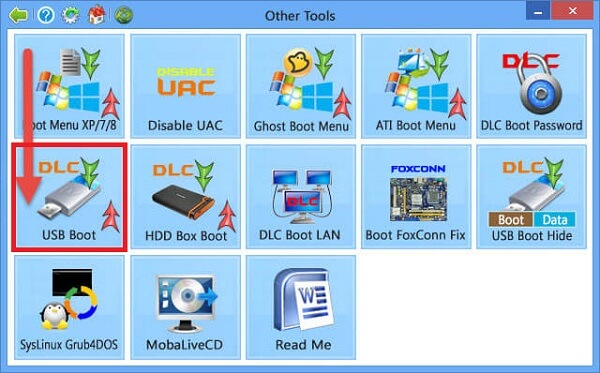
For dlc boot 2013 and 2015, the process differs somewhat from newer versions. You need to follow these steps. Step 1: Download dlc boot 2013 or dlc boot 2015 tools (links are shared above). Step 2: Extract with the latest winrar or mount the virtual drive with ultraiso. Step 3: Insert USB then format it. It’s best to rename your boot usb. Step 4: Run the file DLC1Menu.exe. Step 5: Choose Other tools.
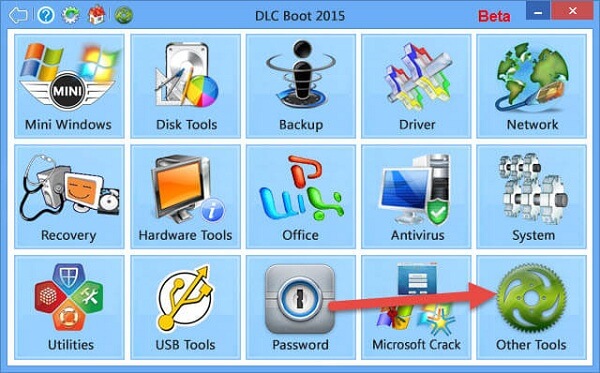
Step 6: Select USB Boot.
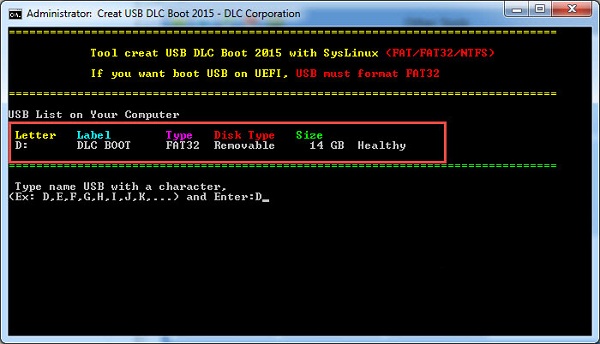
Step 7: Enter the corresponding partition letter of the USB, which is D in my case.
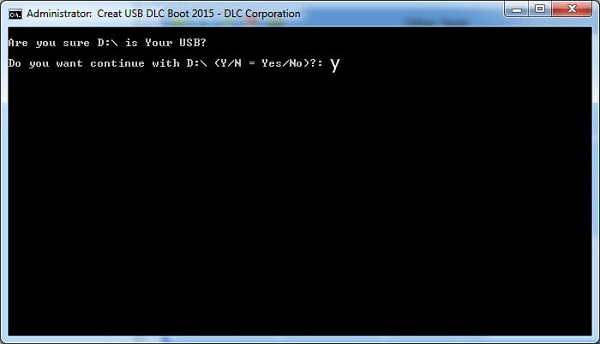
Step 5: Press Y to agree to create the boot USB, then wait a moment. When it reports successful, it means your USB boot is ready.
After completing the USB boot creation, you can turn off the computer and check the result. Thank you for following our guide on creating DLC Boot 2019 USB.
DLC Boot 2019 Frequently Asked Questions (FAQ)
What is DLC Boot 2019?
DLC Boot 2019 is a multi-purpose computer rescue toolkit, allowing you to create USB Boot to install Windows, ghost, fix system errors, recover data, test hardware and many other tasks. This is the version developed by Tran Duy Linh and trusted by the technical community.
Is DLC Boot 2019 safe?
It is completely safe if you download from a reputable source like Softbuzz.net . All files are carefully checked to ensure they do not contain viruses or malware . You should avoid downloading from unknown sources to avoid risks.
Does DLC Boot 2019 support UEFI standard?
Yes! DLC Boot 2019 supports both UEFI and Legacy standards , compatible with most new computers and laptops today.
How is DLC Boot 2019 different from Hiren’s BootCD?
Basically, DLC Boot is considered an upgraded version with a more modern interface, supporting Mini Windows 10 , integrating many new update tools, and is easier to use than the traditional Hiren’s BootCD.
Do I need a large capacity USB to create DLC Boot?
A USB of 4GB or more is enough to create DLC Boot 2019. However, if you want to integrate more tools or a large WinPE version, you should use an 8GB – 16GB USB to ensure stable operation.
Can DLC Boot 2019 be used to reinstall Windows?
Yes. DLC Boot fully integrates ghosting, installation, partitioning, and operating system recovery tools , helping you to manually install Windows or quickly extract ghost without an installation disc.
Is there a newer version of DLC Boot?
Currently, DLC Boot 2020 is the next version, updated with more tools and optimized Mini Win 10. You can see details and download at Softbuzz.net in the System – Computer Rescue section .
Conclude
With powerful integration, easy to use and extremely convenient, DLC Boot 2019 deserves to be the “savior” for all computer problems . Whether you are a professional technician or just a regular user, owning a DLC Boot USB will help you proactively fix operating system errors, recover data, or ghost Windows quickly.
If you are looking for the latest DLC Boot version , or want to update more rescue tools, system software and other detailed instructions , don’t forget to visit Softbuzz regularly so as not to miss useful shares!